Chat in your own language on Discord
Cozirom is a Discord bot that translates chat into the other person's language. Once you turn it on, your messages are posted in translation under your own name and profile picture, and text in images is translated too.
Translations are made by AI (Claude by Anthropic). They can be wrong, so check the original for anything important.
What it does
In translations
Auto-translation
Run
/translate ononce and your messages in that server are posted in the other language, under your own name and profile picture. The original stays under the translation in small text, and the button shows the full original.
Translations1 per message
Text in images
Menus, game screens, memes: if an image has text, it's read and translated. Open it from the
 icon under the images of people who turned translation on, or with right-click translation. Only the person who asked sees the result, and images without text aren't counted.
TranslationsUsually about 9 per image
Translation on the image
Get a copy of the image with the original text erased and the translation drawn in its place, from the
 icon. Pick a font (basic sans, comic, handwriting or bold title) and change it at no cost. It works best on horizontal text such as screenshots, memes and game screens, and only the person who pressed sees the result.
TranslationsUsually about 19 per image
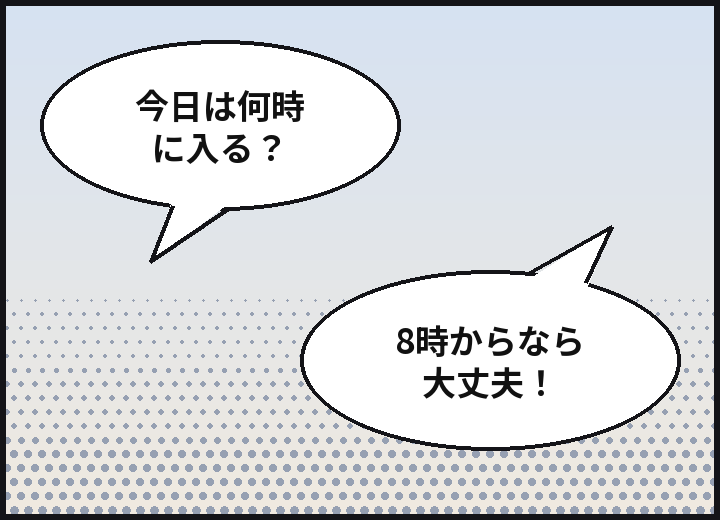
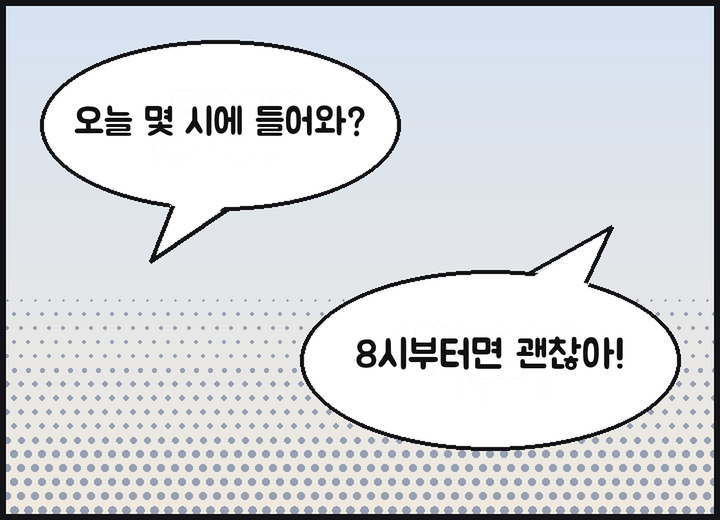
Example: the original image (Japanese speech bubbles), and the same image with the text erased and the Korean translation drawn in the comic font. Voice messages Coming soon
Transcribing and translating voice messages sent from the phone app is being prepared. We'll announce the day it opens in the news.
Translations1 per second, plus the translationA 10-second message is usually 11
Four tones
Slang, casual, polite or formal, chosen per server. Casual with friends, formal somewhere new. On the Guest (free) plan you get all four for the first 14 days, then the polite tone.
TranslationsPaid: all four. Free: the first 14 days
31 languages
31 languages are translated. The bot's screens and command names appear in 30 Discord languages, so the other person sets it up in their own language.
Translations31 translated, 30 for screens
How to start
A server admin adds the bot to the server. Ask for the invite link in the support server.
Anyone who wants to be translated runs
/translate onin that server. The bot guesses your language and theirs and opens the settings panel. Change them in the dropdowns if they're off.Write as usual, and the translation appears under your name. Start on the Guest (free) plan and change plans on the plans page when you need more.
Privacy
Messages to translate and images go only to Anthropic (US). The bot keeps the original of a posted translation for 14 days and cached translations for 30 days, and it doesn't store images or the text read from them. Chat content never goes into logs, and /translate delete-my-data deletes your data at any time.